
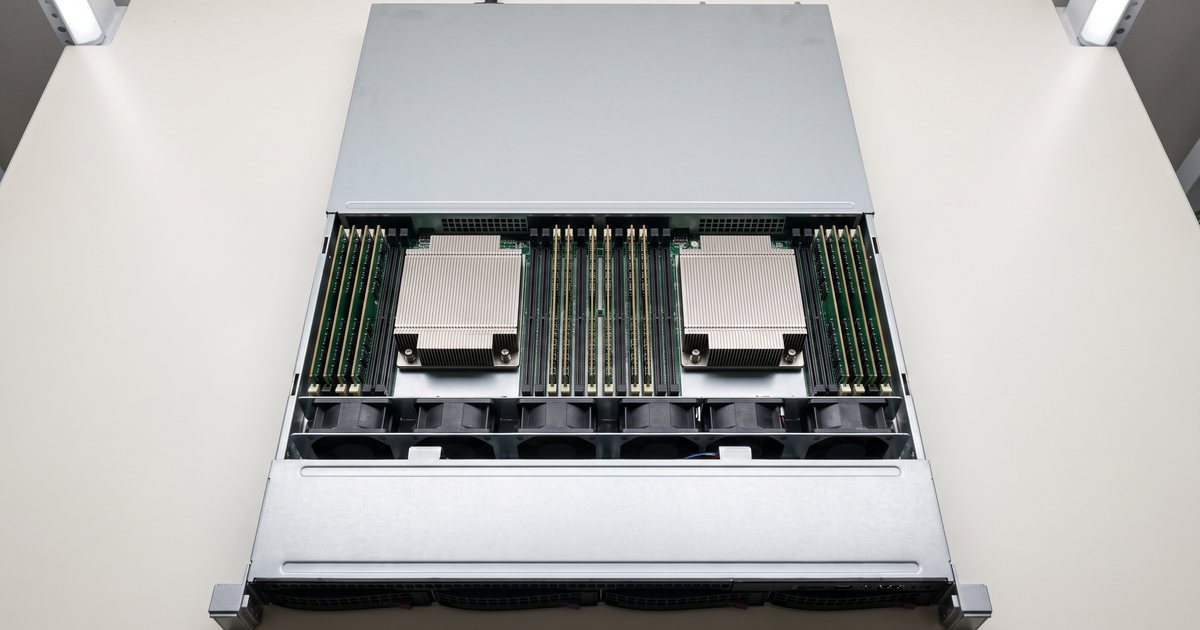
The HPE ProLiant DL380 Gen10 has 24 DDR4 DIMM slots: 12 for each processor, arranged as six memory channels with two slots per channel. Where you put the modules matters as much as how many you buy. HPE publishes a fixed slot order for every module count, and some counts leave the memory unbalanced and slower. This guide gives the slot order, the counts to use, how processor choice sets speed and maximum memory, and the mixing rules that trigger POST warnings. For other HPE models, start with our HPE server memory guide.
Call 1-800-662-7466Request a Quote
The short answer
Install 6 or 12 identical modules per processor. Six modules fill one slot in each of the six channels (slots 1, 3, 5, 8, 10 and 12), which gives full memory bandwidth. Twelve fill both slots in every channel for maximum capacity. On a two-processor server, give both processors the same modules in the same slots, so a full-bandwidth server takes 12 modules and a fully loaded one takes 24.
DL380 Gen10 slot order for 1 to 12 DIMMs per processor
Slots are numbered 1 to 12 for each processor. In each channel, the white slot is populated first and the black slot second. Use the same row for processor 1 and processor 2.
| DIMMs per processor | Slots to populate | Result |
|---|---|---|
| 1 | 8 | Balanced, one channel |
| 2 | 8, 10 | Balanced, two channels |
| 3 | 8, 10, 12 | Balanced, three channels |
| 4 | 3, 5, 8, 10 | Balanced, four channels |
| 6 | 1, 3, 5, 8, 10, 12 | Balanced, all six channels. Recommended |
| 8 | 3, 4, 5, 6, 7, 8, 9, 10 | Balanced, four channels with two modules each |
| 10 | 1, 3, 4, 5, 6, 7, 8, 9, 10, 12 | Unbalanced |
| 12 | 1 to 12 | Balanced, all six channels, two modules each. Maximum capacity |
Source: HPE, Server Memory and Persistent Memory population rules for HPE Gen10 servers with Intel Xeon Scalable processors. HPE marks 5, 7, 9, 10 and 11 modules per processor as unbalanced; if you must use one of those counts, take the slot list from that paper.
Why 6 modules beat 8
Bandwidth comes from channels, not from the number of modules. Eight modules per processor is a balanced layout, but it uses only four of the six channels, two modules deep. HPE notes that 8 modules per processor deliver about 33% less bandwidth than 6. Six modules of a larger size give more capacity at full bandwidth: six 64GB modules (384GB per processor) are faster than eight 32GB modules (256GB per processor).
Unbalanced counts are worse. When channels hold different amounts of memory, the controller splits memory into regions that run at different speeds, and HPE gives an example where the smaller region falls to a third of balanced throughput or less. Performance then varies with where the operating system places each workload.
One processor or two
- Only populate slots that belong to an installed processor. With one processor, the 12 slots on the empty socket are unused.
- With two processors, split the modules evenly and populate each processor by the table above. Matching capacity on both processors avoids slower remote memory access between sockets.
- Both processors must be the same model.
Memory speed depends on the processor
The DL380 Gen10 takes first and second generation Intel Xeon Scalable processors, and the processor sets the memory speed. Faster modules run at the processor limit, so DDR4-2933 modules work in every configuration.
| Processor family | Maximum memory speed |
|---|---|
| Xeon Platinum 8100 and Gold 6100 (1st gen) | DDR4-2666 |
| Xeon Gold 5100 (1st gen) | DDR4-2400 |
| Xeon Platinum 8200 and Gold 6200 (2nd gen) | DDR4-2933 |
| Xeon Gold 5200 (2nd gen) | DDR4-2666 (the Gold 5222 runs at 2933) |
| Xeon Silver 4200 (2nd gen) | DDR4-2400 |
| Xeon Bronze 3200 (2nd gen) | DDR4-2133 |
If modules of different speeds are installed together, the whole system runs at the speed of the slowest module.
Maximum memory: 3TB, if the processor allows it
With 24 slots and 128GB LRDIMMs, the DL380 Gen10 holds 3TB. That is 1.5TB per processor, and not every processor can address that much:
- 1st gen, no suffix (for example Gold 6134): 768GB per processor. M suffix (Gold 6134M): 1.5TB.
- 2nd gen, no suffix: 1TB per processor. M suffix: 2TB. L suffix: 4.5TB.
So 3TB needs M or L processors. With standard processors, the largest balanced layout is 768GB per processor (6 x 128GB or 12 x 64GB), or 1.5TB for a two-processor server.
Mixing rules that cause POST warnings
- RDIMM and LRDIMM never mix in the same server. Pick one type for both processors. Our guide to why RDIMMs and LRDIMMs do not mix explains the reason.
- 128GB LRDIMMs cannot be mixed with other capacities in the server.
- Mixed capacities of the same type are allowed, but lay out each size as if it were the only one, and keep every channel identical to stay balanced.
- Mixed ranks in one channel: put the higher-rank module in the white slot and the lower-rank module in the black slot.
- Mirroring and sparing: if the server is set to Advanced Memory Protection (mirrored or online spare) and the layout does not support it, POST reports an unsupported DIMM configuration and the server falls back to Advanced ECC.
Which NEMIX RAM modules fit the DL380 Gen10
We list DDR4-2933 memory for this server in two types. Use RDIMMs in 32GB and 64GB for most builds, and LRDIMMs in 64GB and 128GB for the largest capacities, up to the 3TB maximum. Kits come in 1, 2, 4, 6 and 12 modules, which line up with the balanced counts above. Ordering against an HPE part number? Our HPE part number lookup maps option and spare numbers to the matching module, and all ProLiant rack models are in HPE ProLiant DL memory.
| Total memory | Processors | Modules | Slots |
|---|---|---|---|
| 192GB | One | 6 x 32GB RDIMM | Slots 1, 3, 5, 8, 10, 12 |
| 384GB | Two | 12 x 32GB RDIMM (6 per processor) | Same six slots on each processor |
| 768GB | Two | 12 x 64GB RDIMM or LRDIMM (6 per processor) | Same six slots on each processor |
| 1.5TB | Two | 12 x 128GB LRDIMM (6 per processor) | Same six slots on each processor |
| 1.5TB | Two | 24 x 64GB RDIMM or LRDIMM (12 per processor) | All 24 slots |
| 3TB | Two, M or L suffix | 24 x 128GB LRDIMM (12 per processor) | All 24 slots |
For 1.5TB, 12 x 128GB keeps full bandwidth on fewer modules and leaves slots free; 24 x 64GB costs less per GB but fills every slot. Have a Gen10 Plus instead? It uses 3rd gen Xeon Scalable processors with eight channels and DDR4-3200, so the slot order above does not apply. See the DL380 Gen10 Plus memory listing.
A note on HPE SmartMemory messages
HPE servers check whether each module is HPE-branded SmartMemory. With modules from other vendors, including NEMIX RAM, iLO can log a POST information message that the DIMM could not be authenticated as genuine HPE SmartMemory and that enhanced and extended SmartMemory features will not be active. That message is informational. A different message, "Unsupported DIMM Configuration", points to a layout or mixing problem covered above.
How to install the modules
- Update the system ROM and iLO first; our HPE BIOS update guide covers it.
- Shut down, unplug both power supplies and ground yourself.
- Remove the access panel and the air baffle over the DIMM slots.
- Install the modules in the slots from the table, white slots first, with the notch aligned and both latches closed.
- Refit the baffle and panel, power on and let memory training finish. The first boot after a change takes longer.
- Check total memory and any POST messages in iLO under Memory Information and the Integrated Management Log.
Step-by-step instructions are in our HPE ProLiant RAM install guide, and error codes are covered in troubleshooting memory errors on HPE ProLiant.
Frequently asked questions
How many DIMM slots does the DL380 Gen10 have?
24: 12 per processor, in six channels with two slots per channel. With one processor installed, 12 slots are usable.
What is the best DIMM count for a DL380 Gen10?
Six identical modules per processor, in slots 1, 3, 5, 8, 10 and 12. That uses all six channels for full bandwidth. Twelve per processor gives maximum capacity, also balanced.
Which slot does the first DIMM go in?
Slot 8 for each processor. Two modules go in slots 8 and 10, and four go in 3, 5, 8 and 10.
Is 8 DIMMs per processor a good configuration?
It is balanced, but it uses only four of the six channels, and HPE notes about 33% less bandwidth than 6 modules per processor. Six larger modules are usually the better choice.
What is the maximum memory in a DL380 Gen10?
3TB with 24 x 128GB LRDIMMs. That needs processors that address 1.5TB each, such as M or L suffix models. Standard 2nd gen processors are limited to 1TB each, and standard 1st gen to 768GB.
Can I mix RDIMMs and LRDIMMs in a DL380 Gen10?
No. RDIMMs and LRDIMMs cannot be mixed in the same server, and 128GB LRDIMMs cannot be mixed with other capacities.
Will DDR4-2933 memory work with a 1st gen Xeon?
Yes. The modules run at the processor limit, DDR4-2666 for Gold 6100 and Platinum 8100, and DDR4-2400 for Gold 5100.
Sources
- HPE, Server Memory and Persistent Memory population rules for HPE Gen10 servers with Intel Xeon Scalable processors (a00017079enw).
- HPE, Memory speed tables for HPE Gen10 servers (a00019564enw).
- Intel, Intel Xeon Scalable processor numbering.
Planning a DL380 Gen10 upgrade or a fleet refresh?
Call a memory specialist at 1-800-662-7466 (Monday to Friday, 9am to 5pm Eastern), or send a quote request and a representative replies within one business day.
What to send: the server model, processor model, how many servers, the memory installed today and the total you want. We will send a slot-by-slot layout with the quote.
Call 1-800-662-7466Request a Quote
Prefer email? Write to sales@nemixram.com. A fillable credit application for net terms is on the quote page.