
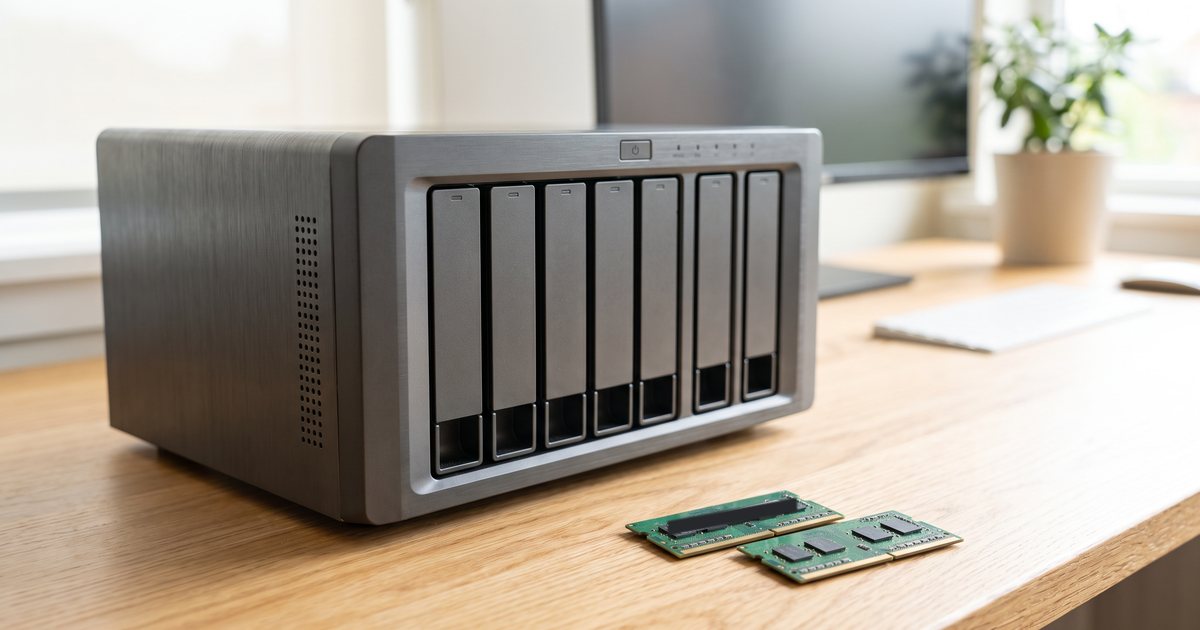
UGREEN sells two 8-bay NASync models with almost the same name and the same chassis: the DXP8800 Plus and the newer DXP8800 Ultra. They take the same type of memory, but not the same amount, and the processor sets the speed limit. This guide covers what each model takes, how far each one goes, the "DXP8800 Pro" name you may see in searches, and how much memory to install. For every other NASync model, see our UGREEN NASync memory guide.
Call 1-800-662-7466Request a Quote
DXP8800 Plus vs DXP8800 Ultra at a glance
| DXP8800 Plus | DXP8800 Ultra | |
|---|---|---|
| Processor | Intel Core i5-1235U | Intel Core 7 150U |
| Memory type | DDR5 SODIMM, non-ECC | DDR5 SODIMM, non-ECC |
| Slots | 2 | 2 |
| Installed from the factory | 8GB DDR5-4800 | 8GB DDR5-4800, one slot used |
| UGREEN maximum | 64GB | 96GB |
| Processor memory limit | DDR5-4800, 64GB | DDR5-5200, 96GB |
| On-die ECC (ODECC) | Supported | Supported |
| Largest kit | 64GB (2 x 32GB) | 96GB (2 x 48GB) |
Specifications are from UGREEN's product pages and Intel's processor specifications, listed under Sources below.
Is there a DXP8800 Pro?
Not in UGREEN's US lineup. The 8-bay models UGREEN sells in the US are the DXP8800 Plus and the DXP8800 Ultra. The "Pro" suffix belongs to the 4-bay DXP4800 Pro and the 6-bay DXP6800 Pro, which is probably why "DXP8800 Pro" turns up in searches and in some third-party listings. One manual hosted on a third-party site uses the DXP8800 Pro name with a Core i7-1255U, two DDR5 SODIMM slots and a 64GB maximum, which is the same memory layout as the Plus.
Either way, the label underneath the unit and the device information panel in UGOS Pro show the exact model and processor. Buy memory for that, not for the name on a listing.
Which memory to buy
- Both models: 262-pin DDR5 SODIMM, non-ECC. Desktop DIMMs and DDR4 do not fit, and neither processor supports ECC modules. The ECC protection UGREEN advertises is on-die ECC, which is part of every DDR5 chip, not ECC modules.
- DXP8800 Plus: up to 32GB per slot, 64GB total. 48GB modules would exceed UGREEN's maximum and the i5-1235U limit.
- DXP8800 Ultra: up to 48GB per slot, 96GB total.
Speed. UGREEN lists the installed module in both models as DDR5-4800, and our DXP8800 Plus and DXP8800 Ultra kits match that speed. The Ultra's Core 7 150U can run DDR5 at up to 5200, so a faster module will work, but the difference is small next to capacity, and matching UGREEN's own speed is the safe choice.
Install in pairs
Both processors have two memory channels, one per slot. Two identical modules use both channels and give the most bandwidth, which helps with Quick Sync video transcoding, virtual machines and large file transfers. On the Ultra, the factory 8GB module leaves the second slot, and so one channel, empty.
- Best: remove the 8GB module and install a matched pair, for example 2 x 16GB or 2 x 32GB.
- Works: keep the 8GB module and add one larger module. The system runs, but only the first 16GB is spread across both channels, and the rest runs on one channel.
- Avoid: mixing speeds or brands when you can, since the pair then runs at the slower module's settings.
How much memory does a DXP8800 need?
| Use | Memory | Kit |
|---|---|---|
| File sharing, backup, photo albums on UGOS Pro | 8GB to 16GB | 2 x 8GB |
| Docker containers, Plex or Jellyfin, a few users | 32GB | 2 x 16GB |
| Virtual machines, surveillance, many containers | 64GB | 2 x 32GB |
| TrueNAS with ZFS on all 8 bays, several VMs (Ultra only) | 96GB | 2 x 48GB |
An eight-bay unit with large drives is where extra memory pays off most: ZFS uses free memory as a read cache, and each virtual machine needs its own allocation. Our guides on memory for containers, memory for virtualization and TrueNAS and ZFS go deeper.
Plus or Ultra: does memory decide it?
If you are choosing between the two, memory is one of the few real differences. The chassis, bays and network ports are shared; the Ultra adds a newer processor and a 96GB ceiling instead of 64GB. If you plan to run several virtual machines or a large ZFS pool, the extra 32GB of headroom is the reason to pick the Ultra. For file serving, backup and media, 64GB in the Plus is more than enough.
How to install the memory
- Shut down from UGOS Pro, unplug the power and ground yourself.
- Open the memory access panel as described in UGREEN's quick start guide.
- Release the clips on the factory module and lift it out if you are replacing it.
- Insert each module at an angle, notch aligned, and press down until the clips lock.
- Close the panel, power on and confirm the total in the UGOS Pro device information panel.
Step-by-step detail is in our UGREEN NASync install guide.
Buying for several units
Studios and offices often run more than one NASync. We supply matched kits for every unit in a single order, on purchase orders and net terms for approved accounts. All UGREEN models are listed in UGREEN NASync memory, and the UGREEN NAS memory page covers the full range.
Frequently asked questions
What RAM does the UGREEN DXP8800 Plus use?
DDR5 SODIMM, non-ECC, in two slots, up to 64GB (2 x 32GB). UGREEN ships it with 8GB of DDR5-4800.
What RAM does the UGREEN DXP8800 Ultra use?
DDR5 SODIMM, non-ECC, in two slots, up to 96GB (2 x 48GB). It ships with one 8GB DDR5-4800 module and the second slot empty.
Is there a UGREEN DXP8800 Pro?
Not in UGREEN's US lineup, which has the DXP8800 Plus and DXP8800 Ultra. The Pro suffix is used on the DXP4800 Pro and DXP6800 Pro. Check the label or UGOS Pro for the exact model before buying memory.
Can I put 96GB in a DXP8800 Plus?
No. UGREEN lists 64GB as the maximum, and the Core i5-1235U is limited to 64GB. 96GB with 48GB modules is for the Ultra.
Does the DXP8800 support ECC memory?
Not ECC modules. Both models support on-die ECC (ODECC), which is part of every DDR5 chip. The UGREEN models that take ECC SODIMMs are the DDR4-based GT models.
Should I keep the 8GB module when upgrading?
For best performance, replace it with a matched pair so both memory channels are used evenly. Adding one larger module next to it works, but part of the memory then runs on a single channel.
Will DDR5-5600 memory work in the DXP8800 Ultra?
It will fit and run, but the Core 7 150U supports DDR5 at up to 5200, and UGREEN lists its own module as DDR5-4800.
Sources
- UGREEN, NASync DXP8800 Plus product page.
- UGREEN, NASync DXP8800 Ultra product page.
- Intel, Core 7 processor 150U specifications.
- Intel, Core i5-1235U specifications.
Upgrading one DXP8800 or several?
Call a memory specialist at 1-800-662-7466 (Monday to Friday, 9am to 5pm Eastern), or send a quote request and a representative replies within one business day.
What to send: the NASync model, how many units, the memory installed now and what the unit runs (file sharing, Docker, VMs or TrueNAS).
Call 1-800-662-7466Request a Quote
Prefer email? Write to sales@nemixram.com. A fillable credit application for net terms is on the quote page.